Your scheduled jobs get done. Even the ones your Mac slept through.
Crontastic runs your scripts and agents on a schedule from the menu bar, and records every run. When your Mac wakes, it catches up, and tells each job exactly which hours it missed.
macOS 14 or later · no account required

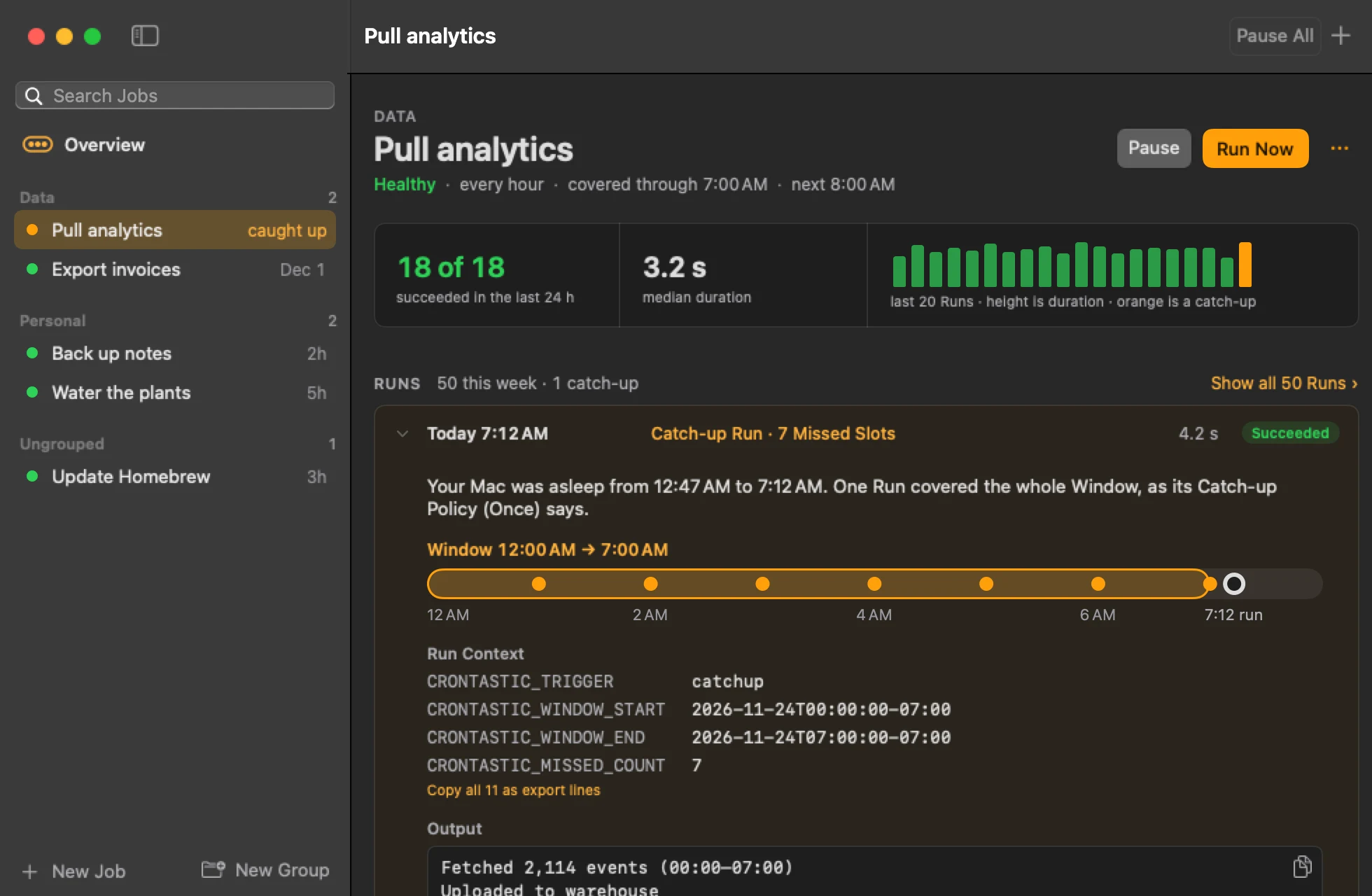
Normal crons skip what they miss. launchd runs once on wake and forgets why. Crontastic hands each job the exact run window it has to cover, and only moves it forward when the run succeeds.
Let your Mac sleep. Crontastic catches up.
Close the lid at 9 PM and the 10 PM job still runs, the moment your Mac wakes.
When it's time to catch up, the job is told its run window: from the last successful run to now. Fetch the data for that span and nothing falls through, however long the Mac slept.
Catch up once, replay each missed run in order, or skip what's past. You choose per job.
How catch-up works# the Run gets its Run Window
CRONTASTIC_WINDOW_START=2026-11-22T00:00:00-08:00
CRONTASTIC_WINDOW_END=2026-11-22T07:00:00-08:00
CRONTASTIC_MISSED_COUNT=7
CRONTASTIC_IS_CATCHUP=1
Your Crontastic jobs, without the silent failures.
Every run is recorded with its output, exit code and duration. A failure sends a notification, and missed runs are shown, not hidden.
The menu bar says what needs you, and when nothing does, it says that too. A run that fails keeps its run window open, so the next run covers that time again.
Get started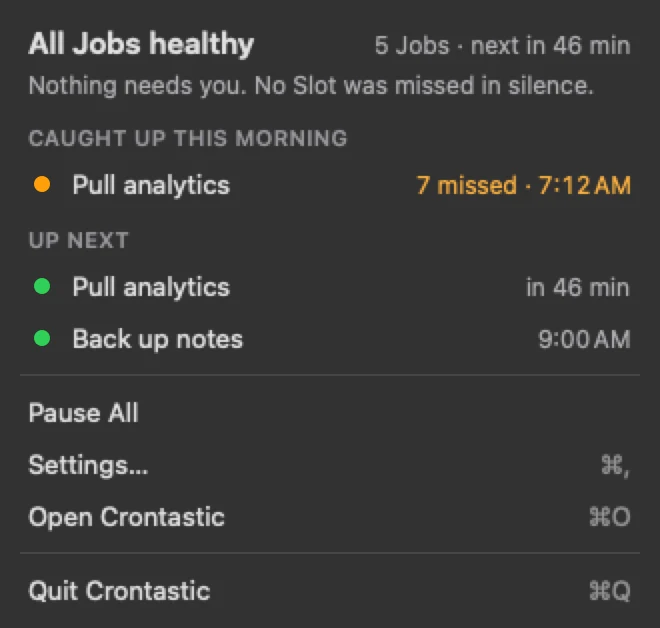
Let AI schedule work on your Mac, with your approval.
Agents create and change jobs through Crontastic's MCP server. Nothing an agent schedules runs until you've read the command and approved it.
Agent jobs run with your files, keychain and tools, and keep the same record as every other run.
Connect an agent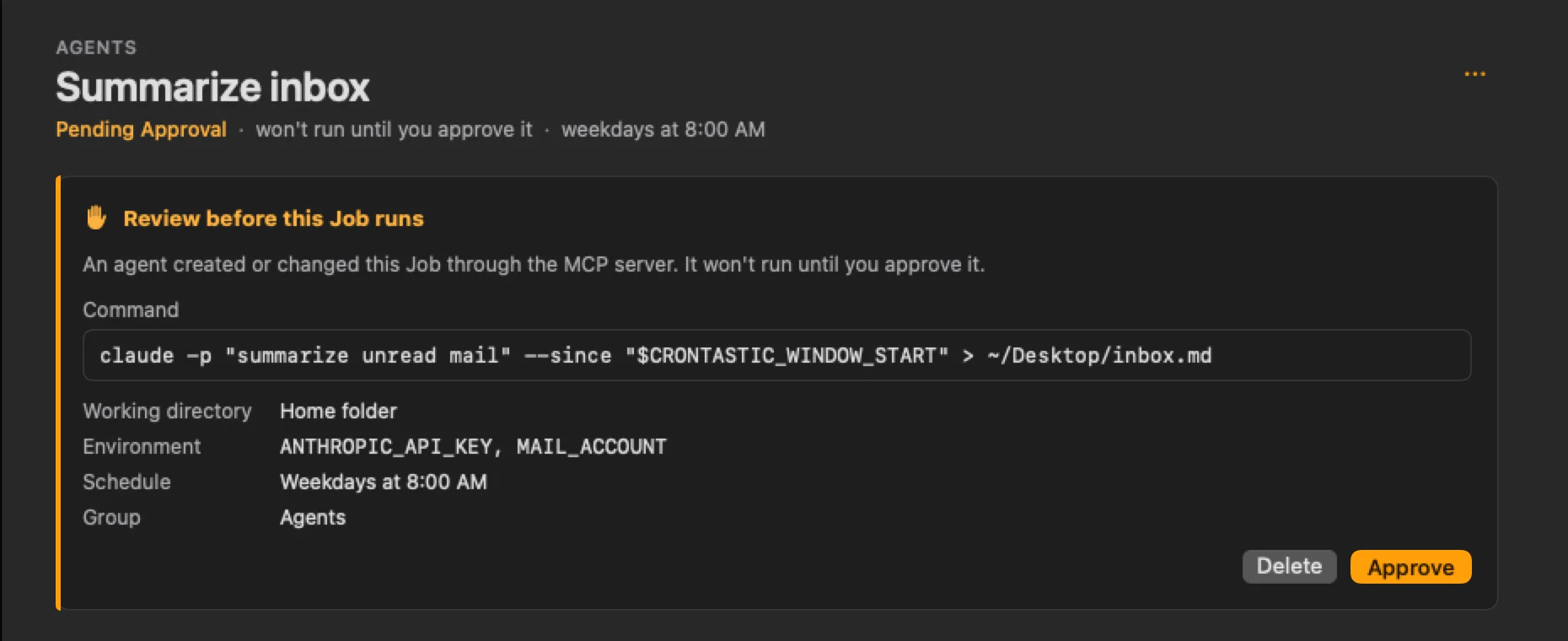
Works in Terminal? Now it works on a schedule.
Runs use your login shell and layered env files: one for every job, one per group, one per job.
Each run shows the PATH it got, and a command not found comes with a hint on where to fix it.
# ~/.config/crontastic/env: every Job
PATH=/opt/homebrew/bin:$PATH

# ~/.config/crontastic/groups/reports.env
REPORTS_DIR=/Users/you/Reports
No plists. No launchctl. Just a command and a schedule.
Make a job in the app, or as a TOML file you can read, edit and keep in git. Schedules can be cron, an interval, or a single date and time.
Schedules# ~/.config/crontastic/jobs/pull-metrics.toml
name = "Pull metrics"
cron = "0 * * * *"
catch_up = "once"
command = '''
~/bin/pull-metrics --since "$CRONTASTIC_WINDOW_START" \
--until "$CRONTASTIC_WINDOW_END"
'''
The rest of it.
Lives in the menu bar
What failed, what caught up this morning and what's next, one click away.
Test before you save
Try a command from the job editor with a real run context. It doesn't count in history.
One-time jobs
Run something once at a set time, like a reminder, and keep its run on record.
Timeouts
A run that hangs is stopped at its timeout and recorded as Timed out.
Groups
File jobs under a group, with an env file the whole group shares.
Time zones
Pin a job to a time zone, so 9 AM in Berlin stays 9 AM in Berlin wherever your Mac goes.
Buy it once. Your jobs never stop.
Schedule 5 jobs with unlimited runs, for free, forever, with every feature. A license is a one-time purchase that unlocks unlimited jobs.